Eric Bodden Current conditions in Darmstadt: Cloud and Visibility OK, 4°C (feels like -1°C)
4°C

Easy and efficient software verification
  • rss
  • Home
  • Research
    • Past Research
      • Efficient Runtime Verification
      • Racer: Effective Race Detection Using AspectJ
      • Continuation-equivalent states (ICSE 2010)
      • Aspect-oriented programming and design
      • Visual specification languages
      • A denial-of-service attack on the Java bytecode verifier
    • Publications
    • Presentations
  • Tools
    • Clara: Compile-time Approximation of Runtime Analyses
    • RacerAJ (for race detection)
    • An introduction to Soot 2.2.5
    • Aspect-oriented approaches targeting the .NET Framework
  • Teaching
    • Automated Software Engineering
    • Software-Engineering Project
    • COMP 520
    • COMP 621
  • Legacy
    • Bad Sector Recovery on NTFS
    • Arithmetic Coding
    • PHP Scripts
  • About me
  • Photos

An introduction to Soot 2.2.5

Soot is a program analysis and transformation framework for Java, developed at the Sable Research Group of McGill University, but with contributions by other researchers from all over the world.

Release 2.2.5 contains some exciting new features, for example:

  • Manu Sridharan’s demand-driven refinement-based context-sensitive points-to analysis, based on Spark
  • a new Thread-local objects analysis, which Halpert et al. used for automatic lock allocation
  • an improved version of our nullness analysis, due to Julian Tibble, and
  • Instance Keys, static representatives of runtime objects.

Furthermore there have been several improvements to the Soot Eclipse plugin to enhance its ease of use.

Soot Eclipse plugin

Installation

To install the latest version of the plugin, start Eclipse and click on:

Help -> Software Updates -> Find and Install

imageSelect Search new features to install and add a new remote site for this URL:

http://www.sable.mcgill.ca/soot/eclipse/updates/


image Select the newly created remote site and the Discovery Site for your Eclipse version. Then click Finish.


image Select the Soot plugin form the list. If eclipse complains that it cannot find Draw2D or GEF, also select Graphical Editors and Frameworks from the Eclipse Discovery Site.

Click Ok and restart Eclipse.


Using the plugin

Assume that we want to use the Soot plugin to analyze the Testclass shown in the figure.

public class Testclass {

	public static void main(String[] args) {
		for (int i = 0; i < args.length; i++) {
			String string = args[i];
			System.err.println(string);
		}
	}

}

image We therefore right-click on the source file and select :

Soot -> Process Source File -> Run Soot…


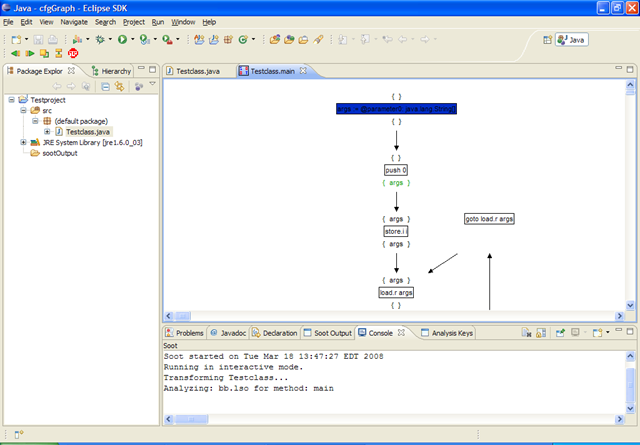
image We further wish to visualize the data flow analysis that Soot performs. In the dialog we therefore enable the Interactive Mode.


image In result, Soot will show you for each method it analyzes the method’s control flow graph, along with the analysis information that is computed. In the figure we see results for the load-store optimizer (as indicated by the console output).

 
Extending Soot (by Example)

image Extending Soot is easy and now we even provide concrete Examples within Eclipse. Click

File -> New -> Example..

and select one of the examples, e.g. A simple BodyTransformer.


imageSoot will create a new Java project to host the example. Enter all necessary information for the project.


image Eclipse will then automatically show the example file.


image Note that the file accesses types like PackManager which are part of the Soot library. How does the project get access to that library? The Soot plugin automatically provides the build path variable SOOTCLASSES that points to soot’s library. For example projects, this variable is added automatically. If you want to extend Soot without using an example project you can just add the variable by yourself. (right-click on your project and select BuildPath)

Assume now that we want to apply our new BodyTransformer to the Testclass class, as before. Again, right-click on Testclass.java and select, as before:

Soot -> Process Source File -> Run Soot…

image Only this time select the Soot Main Class tab and set the values as shown in the Figure. This advises the plugin to start Soot by calling MyMain in project MyBodyTranformer. The console view will now show that the customized BodyTransformer executed.

Comments rss
Comments rss
Trackback
Trackback

6 Responses to “An introduction to Soot 2.2.5”

  1. Giriprasad S says:
    April 13, 2009 at 3:38 pm

    Hi Eric,

    Thanks for these nice posts about SOOT. I am beginning to use SOOT for some
    simple data flow analysis in my research (I am trying to do a PhD in CS at
    University of Delaware, USA)

    I used SOOT to do the reaching def analysis and got expected results. I have a doubt
    about the following:

    public int m1() // in a class C1
    {
    init();
    return field1; // field is an integer field in the C1
    }

    private void init()
    {
    field1 = 5;
    }

    the above assignment provides a definition for field1 that reaches the return
    statement in m1(). The default Jimple Annotation pack reaching def
    did not show this (though I did select inter-procedure and entire program
    mode). Am I missing something here?

    Thanks a lot!
    Giri

  2. eric says:
    April 13, 2009 at 3:49 pm

    Hi. Very good question. The answer is simple, though: the reaching-definitions analysis in Soot is intra-procedural, which means that it does not consider outgoing method calls like the one from m1() to init(). What you are looking for is an inter-procedural RD analysis, but to the best of my knowledge Soot does not come with such an analysis out-of-the box.

    Eric

  3. Giriprasad S says:
    April 14, 2009 at 7:02 pm

    Vielen Dank! Eric. I will explore the survivor’s guide to see how inter-procedural
    analysis can be added (if I see the need for it)

    Best Wishes
    Giri

  4. Giriprasad says:
    April 19, 2009 at 9:23 pm

    Hi Eric,

    I am sorry to trouble you again, but I did not find a suitable answer in the
    survivor’s guide or the PLDI tutorial slides etc.

    My issue is with reaching defs. Soot does intra-procedural reaching defs. But what
    exactly does it do when it encounters a method call?

    Ex:

    1 area = initialize();
    2 area = computeArea();
    3 print (area);
    4 return area;

    Soot tells (correctly) that the def on line 2 (but not line 1) reaches line 4. BUT how
    did it know that line 3 did not assign to area? (assume area is a field or
    can be changed within print)

    Thanks
    Giri

  5. Giriprasad says:
    April 19, 2009 at 9:28 pm

    Hi Eric,

    A small continuation of the doubt in my previous comment.

    The simple reaching def tagger that comes off the shelf with soot, simply ignores
    outgoing calls? Is that correct behaviour? My advisor Lori Pollock told me that conservatively a reaching def tagger must warn
    you that the value could be modified within the call (please see the example)

    Thanks
    Giri

  6. eric says:
    April 19, 2009 at 11:08 pm

    Hi Giri.

    I assume that you are talking about SmartLocalDefs, used by the ReachingDefsTagger? If so, then the following holds: SmartLocalDefs gives you the reaching definitions of local variables. When area is a local variable then print(…) obviously cannot write to it. Local variables can only be written to within the local method. They are, effectively, stack locations. Your advisor Lori is right in the case where area is a field, but SimpleLocalDefs only gives information for local variables. Hope that clarifies things…

    Eric

Leave a Reply

Click here to cancel reply.

Welcome

Welcome to my website. Interested in my research? Click here for details or jump directly to my publications.

Pages

  • Research
    • Past Research
      • Continuation-equivalent states (ICSE 2010)
      • Efficient Runtime Verification
      • Racer: Effective Race Detection Using AspectJ
      • Aspect-oriented programming and design
      • Visual specification languages
      • A denial-of-service attack on the Java bytecode verifier
    • Publications
    • Presentations
  • Tools
    • Clara: Compile-time Approximation of Runtime Analyses
    • RacerAJ (for race detection)
    • An introduction to Soot 2.2.5
    • Aspect-oriented approaches targeting the .NET Framework
  • Teaching
    • Automated Software Engineering
    • Software-Engineering Project
    • COMP 520
    • COMP 621
  • Legacy
    • Arithmetic Coding
    • Bad Sector Recovery on NTFS
    • PHP Scripts
  • About me

Categories & Feeds

  • Misc RSS Feed Icon (89)
  • Montreal Blog RSS Feed Icon (44)
  • Research Blog RSS Feed Icon (67)
  • Comments (RSS) RSS Feed Icon

Kitchensink

  • Conferences
  • My first patent: Method and system for performance profiling of software (pending)
  • Photos

Research projects

  • AspectBench Compiler (abc)
  • J-LO
  • Soot
  • Stratified aspects

Service

  • AOSD 2006
  • AOSD 2007
  • AOSD 2010
  • AOSD 2011
  • Association of Alumni, Friends, and Supporters of the RWTH Aachen University in North America
  • ATVA 2008
  • ECOOP 2008 Doctoral Symposium
  • ECOOP 2010
  • FOAL 2010
  • IEEE Transactions on Software Engineering (TSE)
  • International Journal of Image and Graphics
  • ISSTA 2011
  • OOPSLA 2008
  • PEPM 2008
  • PLDI 2006
  • PLDI 2008
  • RV 2007
  • RV 2009
  • RV 2010
  • SEFM 2005
  • SEFM 2008
  • Transactions on Software Engineering and Methodology (TOSEM)
  • VMIL 2008
  • VMIL 2009

Some of my colleagues

  • Gregory Prokopski
  • Laurie Hendren
  • Nomair Naeem
  • Ondrej Lhotak
  • Patrick Lam
  • Programming Tools Group
  • Sable lab

Some other people I know

  • Adrian Colyer
  • Bruno Dufour
  • Dan North
  • Daniel Klink
  • Dave Thomas
  • Dean Wampler
  • Friedrich Steimann
  • Joachim Kneis
  • Klaus Havelund
  • Liz Keogh
  • Malte Clasen
  • Markus Schorn
  • Pascal Costanza
  • Patricia Jablonski
  • Philip Mayer
  • Ron Bodkin
  • Sven Wittig
  • Wiebke Berg

Some people not to confuse me with

  • Eric B. the terrorist
  • Eric Bodden the basketball player
  • Eric Bodden the chef who sunk
  • Eric Christopher Bodden
  • Noel R. Lopez alias Eric Bodden

Previous posts

March 2010
M T W T F S S
« Feb    
1234567
891011121314
15161718192021
22232425262728
293031  

Tags

Alumni AspectJ Atlanta Blizzard Bug finding Clara COMP 621 Eclipse Flight FSE Google ISSTA Java LinkedIn Mac McGill Microsoft Montreal Blog OOPSLA Oxford Photos Politics Programming Quebec City Race detection Racer Random ranting Runtime verification RWTH Seattle Ski trip Snow Snow storm Soot Soot Tutorial Static Analysis Strike TA strike Thesis tracematches Typestate Vacation Website Winter carnival Wordpress


rss Comments rss valid xhtml 1.1 design by jide powered by Wordpress get firefox